Release Info for TMS - version 9.2 - Release Date: June 20, 2011
Introduction
This document describes the changes that have been made in this release of the TMS system. Please make sure to read this entire document and make any changes to your processes and procedures as necessary.
Additional Products Needed
This version of the TMS can be used with the Media Adaptation Tool (MAT) version 6.0.3 and above.
Functionality Incorporated into this Release
The following features and enhancements are included in this release:
- UI Redesign
- Stock Assets
- Add Comments to Title Reports
- Include Job Type in Outputs Report
- Timezone Setting Used in Date Completed Milestones
- Add Distribution List to Request Translation Notification
- Show Countries in Core Asset List View
- Add SKU Details to Emails
UI Redesign
Feature/Enhancement
The UI has been redesigned to help with customization and speed up page loading.
Who Does This Affect?
All users.
What Does this Mean to Me?
This change will have little obvious affect on the user, although you may notice a slight difference in the way that the tabs and buttons are displayed as they now use text instead of images.
Stock Assets
Feature/Enhancement
Users with the relevant permission can now upload and download assets to a stock assets store. Stock assets are not tied to a specific campaign and therefore this is a global repository for assets such as logos, legal warnings, etc.
Who Does This Affect?
Users need to be given a specific permission to be able to see the Stock Assets tab.
What Does this Mean to Me?
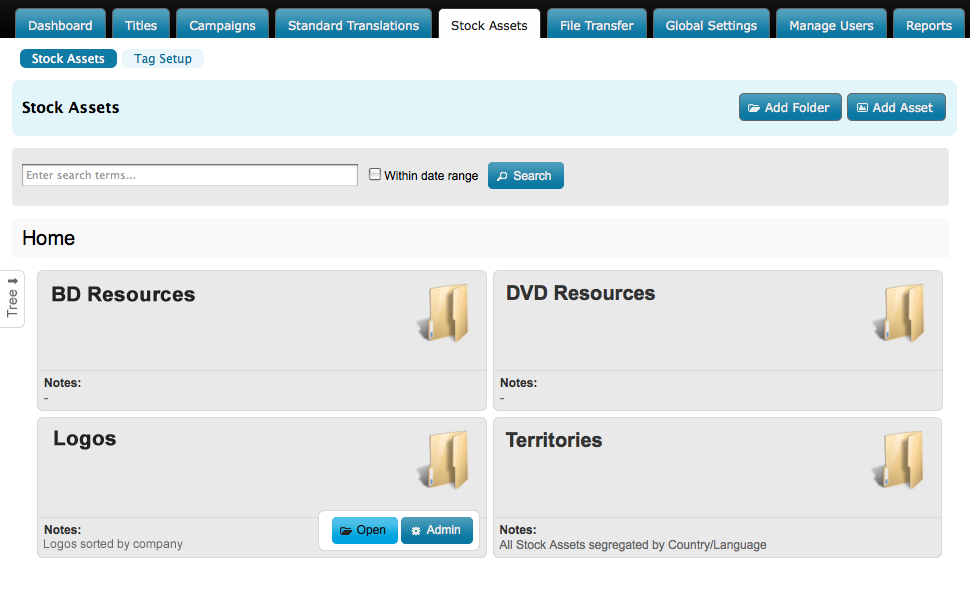
If you are given access to Stock Assets you will see a new tab on the tab bar. Clicking the tab will show a list of folders and assets similar to the following:
Viewing
You can open a tree view of the folder structure by clicking Tree:
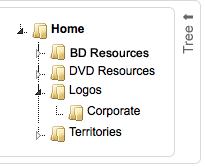
To open a folder click it's name within the tree or hover over the folder pane and click the Open button that is displayed. You can expand a folder to show its contents by clicking the small triangle within the tree. You can use the folder 'breadcrumbs' at the top of the page to move up the folder structure.
Uploading
To add an asset to a folder, navigate to the folder and then click
 . You will be prompted to enter the asset details:
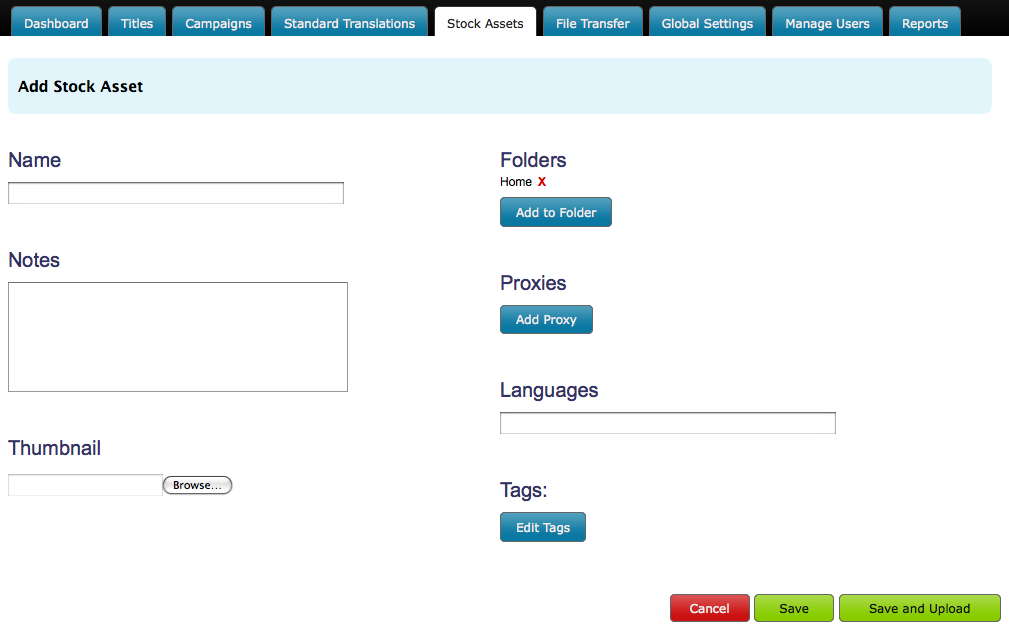
The fields are as follows:
- Name - the name of the asset as you want it to appear in the system.
- Notes - any notes you want to attach to the asset
- Thumbnail - a preview image of the asset. By default the system will attempt to create it's own thumbnail for image files, but in the case of audio or video files you may want to supply your own.
- Folders - a list of folders where the asset will be stored. You can add the asset to more than one folder but only one copy of the asset will actually exist in the system. This means that when you edit or replace the asset it will be updated in all locations.
- Proxies - a list of folder/language combinations where the asset is used as a proxy or alias. This allows you to include the asset in a folder as a substitute for another asset that is not available in that language. For example, take the case where a particular warning card asset is not available in a language - say Icelandic - and the user should use an English replacement. In your Icelandic folder you might want to include a full set of all the warning cards, but you don't want the user to miss using the English card, so you include it as a proxy in the Icelandic folder. This way the user knows that they need to get all the Icelandic warning cards plus the English warning card.
- Languages - the languages associated with this asset.
- Tags - any keywords associated with this asset - the tags can be already stored in the system or new ones can be added.
Downloading and Sending
Assets held in the system can be downloaded directly or sent to recipients who do not have direct access to the system. Navigate to the asset and then click either Download or Send:
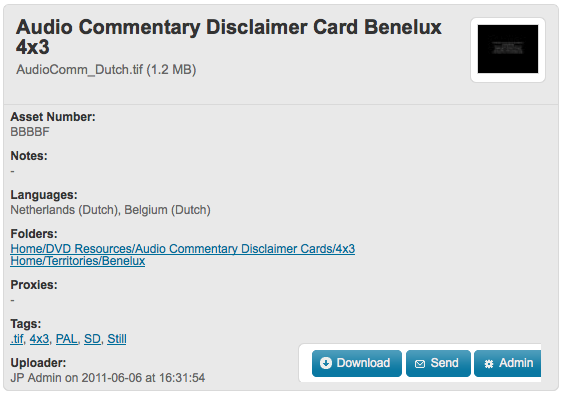
Clicking Send will add the asset to your Send Assets list (available from the top right of your screen or from the File Transfer tab) so that you can send multiple assets to multiple recipients.
Tag Organization
Tags can be arranged into groups so that they can be managed as a collection - for example you could have' aspect ratio' as a group so that the user is forced to select between 4x3 and 16x9 when adding an aspect ratio. You can also relate tags so that users entering or searching for specific tags can use a variety of terms - such as BD, Blu-Ray, Blurray and HD.
Add Comments to Title Reports
Feature/Enhancement
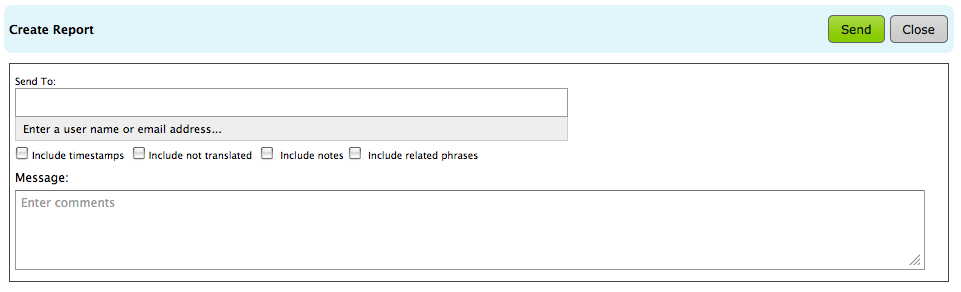
You can now add your own message to a Title report before sending it as an email.
Who Does This Affect?
Titles administrators.
What Does this Mean to Me?
When you click Create Report on the Review Translations page for a title you will be able to specify a message for the email recipients as well as a list of the recipients and what to include in the report:
Include Job Type in Output Reports
Feature/Enhancement
You can now add the Job Type field to an output report.
Who Does This Affect?
Administrators.
What Does this Mean to Me?
When defining a report you can add the Job Type field to your report.
Timezone Setting Used in Date Completed Milestones
Feature/Enhancement
The users time zone setting is now reflected in the Date Completed fields on the Job Details page.
Who Does This Affect?
Administrators.
What Does this Mean to Me?
When looking at the Date Completed fields on the Job Details page, the date and time now reflect your local time zone settings.
Add Distribution List to Request Translation Notification
Feature/Enhancement
The notification distribution list is now included in the Request Translation notification.
Who Does This Affect?
Administrators.
What Does this Mean to Me?
You will see a list of all the recipients of the Request Translation notification in the notification email.
Show Countries in Core Asset List View
Feature/Enhancement
The list of core assets should also show the countries to which the core assets are assigned.
Who Does This Affect?
Administrators.
What Does this Mean to Me?
You should see a list of the countries a core asset is accessible for on the core assets list page.
Add SKU Details to Emails
Feature/Enhancement
The Translation Requested and Translation Received emails should include a list of the SKUs that are affected by the translations.
Who Does This Affect?
Administrators.
What Does this Mean to Me?
A translation request or translation received notification now includes a list of the SKUs affected by that translation.This will allow the administrators to more accurately filter the emails.