Release info for TMS - version 8.2.0.8 - Release Date: March 7, 2011
Introduction
This document describes the changes that have been made in this release of the TMS system. Please make sure to read this entire document and make any changes to your processes and procedures as necessary.
Additional Products Needed
This version of the TMS can be used with the Media Adaptation Tool (MAT) version 6.0.3 and above.
Functionality Incorporated into this Release
The following features and enhancements are included in this release:
- Stock Assets - UI Improvements
- Proofing Tool - Easier Navigation of Other Assets
- Output Assets - Improved Thumbnail Generation
Stock Assets - UI Improvements
Feature/Enhancement
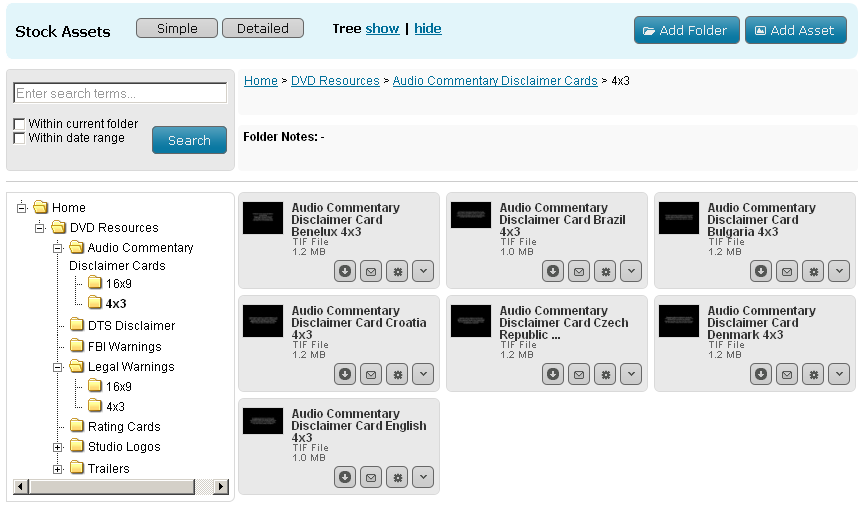
The UI has been redesigned to allow more assets to be displayed on screen at one time.
Who Does This Affect?
All Stock Assets users.
What Does this Mean to Me?
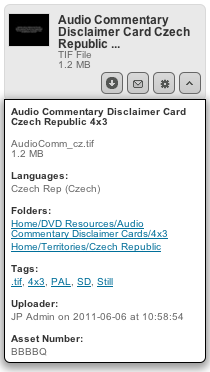
Most of the information about each Stock Asset will now be hidden by default. To display this information for an individual asset it is neccasary to click the expand button  , this will slide a panel down from the asset, clicking the button again will slide the panel back up.
This action can also be performed on folders to display any notes they may have.

Clicking the "Detailed" button will display full information about all the assets on screen. Selecting the "Simple" button will hide the extra information.
The control for toggling the display of the tree has now moved to the upper header bar. The tree is now shown by default.
Your selections of asset detail and tree display will be remembered between visits.
Proofing Tool - Easier Navigation of Other Assets
Feature/Enhancement
Users were having difficulty navigating through related assets from inside the proofing tool, some UI changes have been made to help with this issue.
Who Does This Affect?
All users of the proofing tool but those who approve assets will notice the most benefit.
What Does this Mean to Me?
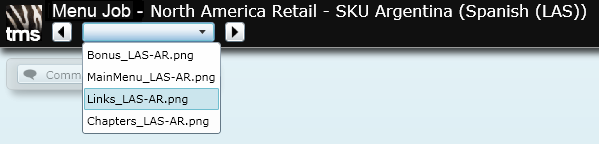
If you use the proofing tool to view assets with two or more related assets then you will notice that the previous "Show other Assets" dialog has now moved to a dropdown list in the top left of the tool. Next and Previous buttons have been added to either side of the list. Dropping down the list will highlight the currently viewed asset and it's position.
Output Assets - Improved Thumbnail Generation
Feature/Enhancement
Users were reporting issues with the quality of thumbnails being generated from output PDF's.
Who Does This Affect?
All users that view output assets.
What Does this Mean to Me?
It's most likely that you will notice no change, but the quality of thumbnails created from output assets which are PDF's should be increased.